
ERP
4 Best ERP Software for Small Businesses in Los Angeles
Compare custom ERP, Odoo, Business Central, and NetSuite for Los Angeles small businesses.
Editorial note
This article reflects Solutyics’ practical delivery perspective. It provides general implementation guidance and does not promise a particular commercial or technical outcome.
The best ERP software for small businesses is the system that matches your processes, headcount, and budget, not the one with the longest feature list. Choose a custom-built ERP if your workflow is unusual. Choose Odoo if you want to start cheap and add modules later. Choose Microsoft Dynamics 365 Business Central if your team already lives in Microsoft 365. Choose NetSuite if you expect to add entities, currencies, or locations fast.
Most small companies in Los Angeles County hit the same wall. Spreadsheets and basic accounting software stop keeping inventory, purchasing, and orders in one place. Then vendor quotes arrive with per-user fees, add-on modules, and implementation costs, and nobody can tell you the real total. This article compares four options on features, pricing, and fit, then shows you how to choose a partner near you.
We build ERP systems at Solutyics, an engineering studio, so we list our custom approach first. We also say plainly when a packaged product is the smarter buy. Prices are list prices at the time of writing and vendors change them, so confirm current figures before you commit.
1. Solutyics custom ERP
A custom ERP is the right pick when your workflow does not fit a packaged product. Solutyics builds the system around how your company actually operates.

Features and fit
Solutyics builds ERP systems for small and mid-size companies, mostly in sales and distribution, manufacturing, and wholesale. Past builds include a wholesale platform that connects stock, credit, branches, and cash, and a manufacturing quality system that runs from incoming lot inspection to final passing. Client-owned code and documentation mean you can hand the system to your own team or another developer later.
The trade-off is that you do not get a finished product on day one. Delivery is senior-led and remote-ready, with reviewable increments and clear specifications, so expect video calls rather than an office visit. Custom suits you if you run field teams, batch tracking, or approval chains that packaged ERP forces you to bend. If your needs are plain bookkeeping and stock counts, buy packaged.
Build custom only when your process is the thing that makes your business different.
Pricing and cost
Custom ERP is a project budget, not a per-seat subscription. The Solutyics enquiry form offers budget ranges from below US$10,000 to US$75,000+, and scope decides where you land. Starting with the one module that hurts most, such as inventory or order booking, keeps the first phase small.
Hosting and support are agreed separately, and the system can run in your own cloud account. Because you own the code, you are not renting seats from a vendor, so adding staff does not add license fees.
2. Odoo
Odoo is the best low-cost, modular choice for small businesses that want to start with one or two apps and grow from there.
Features and fit
Odoo covers accounting, inventory, purchasing, sales, CRM, manufacturing, and e-commerce in one database. You switch on only the apps you need. Its modular design keeps early costs low, and a free open-source Community edition exists for teams that can self-host.
Quality varies with the partner who configures it. Self-hosting Community also makes you responsible for hosting, backups, and upgrades. Odoo suits product businesses with roughly 10 to 50 staff, such as small distributors or e-commerce sellers, who want to replace spreadsheets step by step.
Odoo rewards you for starting small, as long as your implementer is good.
Pricing and cost
Odoo Online is priced per user per month. At last check, the Standard plan was roughly $25 per user per month and the Custom plan was in the high $30s, billed annually. Implementation, data migration, and training come on top.
The Community edition carries no license fee, but hosting and partner hours still cost money. ERPNext is another open-source option you can self-host for free, with the same caveat. That makes both worth a look if you searched for a free ERP, as long as you budget for setup.
3. Microsoft Dynamics 365 Business Central
Business Central is the strongest pick for small businesses already working in Microsoft 365, Excel, and Outlook.
Features and fit
Business Central handles finance, inventory, sales, purchasing, and light manufacturing and project work in the cloud. It connects with Excel, Outlook, and Power BI, so your team keeps familiar tools. Microsoft’s large partner network also makes it easier than most to find an implementer.
Setup is heavier than Odoo, and customization usually runs through a partner. It fits companies with 10 to 200 employees, an in-house accountant, and standard financial processes. A firm with strict reporting needs will like its structure. A team that wants quick tinkering may find it rigid.
If your team already lives in Microsoft tools, this is the lowest-friction ERP to adopt.
Pricing and cost
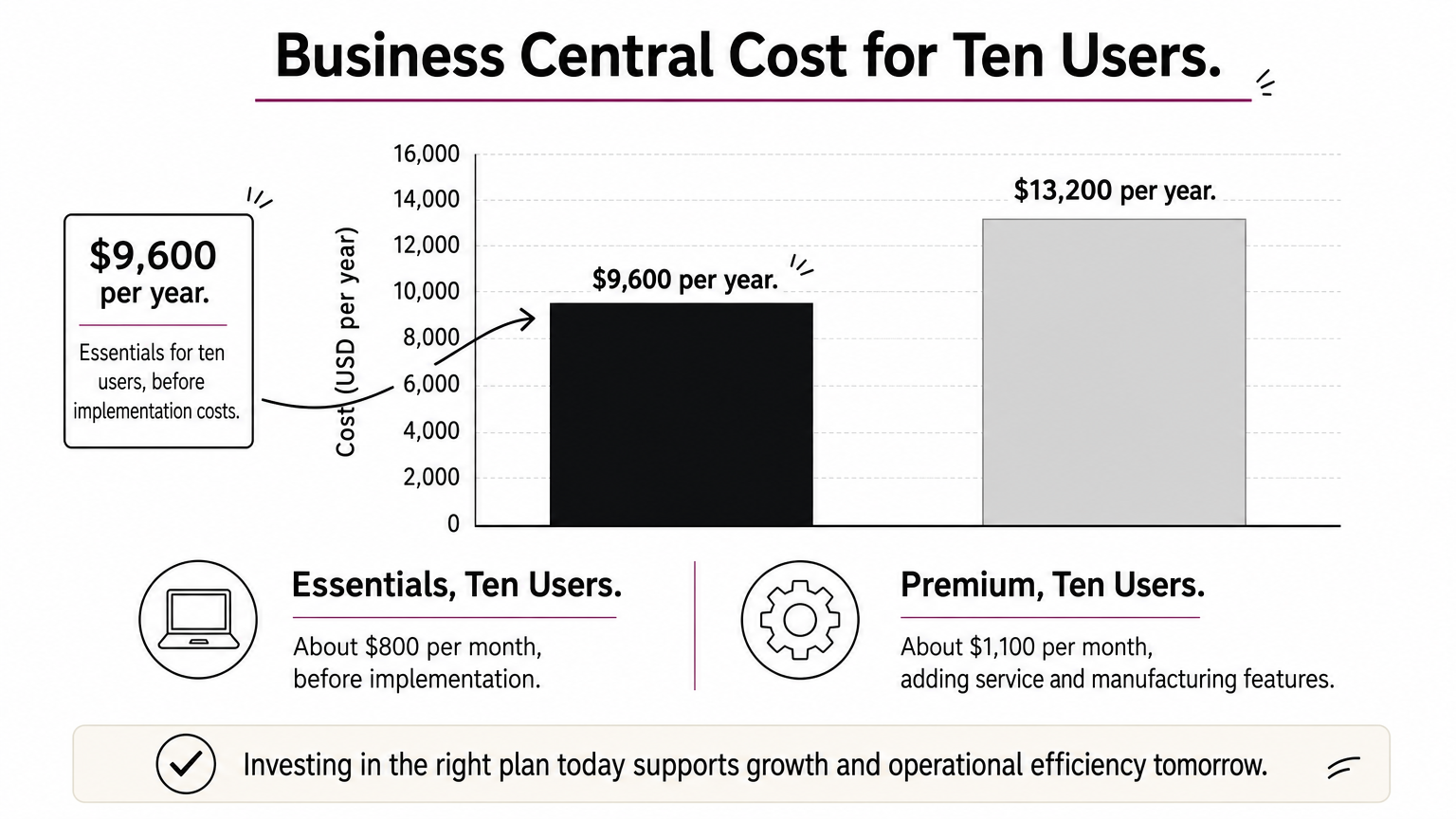
List prices have been about $80 per user per month for Essentials and about $110 for Premium, which adds service and manufacturing features. A Team Member license, about $8 per user per month, covers light users who only view data or approve items.
Here is a worked example. Ten full users on Essentials cost about $800 per month, or $9,600 per year, before implementation. Ten users on Premium cost about $1,100 per month, or $13,200 per year.
4. NetSuite
NetSuite is the right pick when you expect to outgrow a small-business system within a few years.

Features and fit
Oracle’s NetSuite is a cloud ERP with financials, inventory, order management, CRM, and e-commerce in one platform. Its strengths are multi-entity and multi-currency accounting and deep reporting. Companies that add subsidiaries, warehouses, or international sales find they never need to migrate again.
Under about 15 employees, it is usually more system than you need, and the setup takes months. It suits growing wholesalers, brands, and distributors that are heading toward investor reporting or acquisitions.
NetSuite pays off when growth is the plan, not when it is a hope.
Pricing and cost
NetSuite pricing is quote-based. Expect a base platform fee, per-user licenses, charges for each module, and a separate implementation project. Over three years it is typically the most expensive option here.
Ask for an itemized quote that includes implementation, support, and renewal terms, because year-two increases catch buyers off guard. Compare that figure against the 36-month cost of the other options, not the first-month price.
How to choose the right ERP and a partner near you
Choose by matching process complexity and growth plans to the pricing model, then pick a partner who has delivered in your industry.
Match the system to your size and budget
The table below puts the four options side by side.
| Option | Pricing model | Starting point | Best for |
|---|---|---|---|
| Solutyics custom ERP | Project budget | Enquiry budgets from under $10,000 to $75,000+ | Unusual workflows, code ownership |
| Odoo | Per user per month, or free Community | About $25 per user per month (Online Standard) | Product businesses starting small |
| Business Central | Per user per month | About $80 per user per month (Essentials) | Microsoft 365 teams |
| NetSuite | Quote | Base fee plus per-user licenses | Fast-growing, multi-entity firms |
A useful test is this: if you re-key the same data into three or more tools, you have outgrown spreadsheets and need an ERP. ERP is not being replaced. AI assistants and vertical apps are being added on top of it, so choose a system with open APIs.
Find an implementation partner in Los Angeles County
Start with the vendor’s own partner directory and shortlist three firms. In-person workshops matter if you run a warehouse or shop floor. Remote delivery can work well for finance-heavy setups and often costs less. Before you sign, ask each firm:
- Can you show references from a business like mine?
- Will the first phase have a fixed scope and price?
- How will you migrate my existing data?
- Can the system handle California’s district sales taxes, which make rates vary by location?
- Who owns the configuration, code, and data if we part ways?
- Are support hours aligned with Pacific time?
A good partner is worth more than a good product, so interview them as hard as you test the software.
Pick the smallest system that fits
For most small businesses, the answer comes down to fit. Choose Odoo for modular, low-cost growth. Choose Business Central if Microsoft tools run your day. Choose NetSuite if multi-entity growth is on the near horizon. Choose custom if your process is your edge and no packaged product matches it. Whatever you pick, start with the module that hurts most and verify the three-year cost.
If you think custom is the right path, talk to Solutyics about your ERP. Describe what you run today, what is failing, and what should change, and we will map it to a first phase.